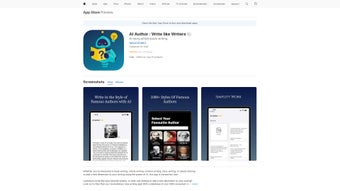

Download AI Author – AI Writing Assistant, Style‑Mimic Tool & PDF Exporter
AI Author is a web‑based writing companion that blends cutting‑edge artificial intelligence with the literary flair of more than a thousand celebrated authors. Whether you are drafting a novel, polishing a blog article, or shaping a short story, AI Author lets you select a preferred writer—like Hemingway, Austen, or Murakami—and instantly applies that author’s grammar, tone, and stylistic nuances to your text. The result is content that feels authentic to the chosen voice while retaining your original ideas. Beyond style‑mirroring, the platform offers one‑click conversion of any document into a professional PDF, seamless integration with GoodNotes for effortless copying, and an intuitive interface that welcomes beginners and seasoned writers alike. In short, AI Author transforms ordinary drafts into polished, publish‑ready pieces without the steep learning curve of traditional editing software.
Key Features of AI Author
- Style‑Mimic Engine: Choose from over 1,000 renowned authors and let the AI re‑tone your writing to match their unique voice.
- Real‑Time Suggestions: Instant grammar, punctuation, and stylistic recommendations appear as you type.
- One‑Click PDF Export: Convert finished drafts into high‑resolution PDF files ready for sharing, printing, or publishing.
- GoodNotes Integration: Copy and paste directly into GoodNotes, preserving formatting and style.
- Multi‑Document Workspace: Work on several projects simultaneously with a tabbed interface.
- Customizable Tone Slider: Adjust the intensity of the author’s style from subtle influence to full immersion.
- Secure Cloud Storage: All documents are saved encrypted on the cloud, ensuring privacy and easy access from any device.
- Cross‑Platform Accessibility: Fully functional on Windows, macOS, Android, and iOS through any modern web browser.
- Frequent Model Updates: The AI models are refreshed monthly to incorporate new writing trends and additional author profiles.
- Free Tier & Affordable Plans: A generous free version offers core features, while premium subscriptions unlock unlimited style selections and batch PDF processing.
How to Install and Use AI Author
Getting started with AI Author is straightforward because the application lives entirely in the cloud—no heavy downloads or system‑level installations are required. Follow these steps for a smooth onboarding experience:
- Create an Account: Visit aiauthor.io and click “Sign Up.” You can register using an email address or link a Google/Apple ID for instant access.
- Verify Your Email: A verification link is sent to your inbox. Click it to activate your account and unlock the free tier.
- Choose a Subscription (Optional): If you need advanced features—unlimited author selections, batch PDF export, or priority support—navigate to the “Pricing” page and select a plan that fits your workflow.
- Launch the Editor: After logging in, you’ll be directed to the main dashboard. Click “New Document” to open the AI‑powered writing canvas.
- Select an Author Style: In the right‑hand sidebar, browse the author catalog. Use filters (genre, era, language) to narrow down choices, then click “Apply.” The AI will analyze your input and begin adapting the tone automatically.
- Write or Paste Your Text: Begin typing directly into the editor, or paste existing drafts. As you type, AI Author highlights suggestions in a subtle underline—click a suggestion to accept, or hover for an explanation.
- Fine‑Tune the Influence: Use the “Tone Slider” beneath the author name to dial the strength of the stylistic influence. A lower setting retains more of your original voice, while a higher setting fully embraces the chosen author’s style.
- Export to PDF: When satisfied, click the “Export” button at the top toolbar, select “PDF,” and choose export settings (page size, margins, header/footer). The file downloads instantly, ready for distribution.
- Sync with GoodNotes: Open GoodNotes, create a new note, and paste the content directly. The formatting remains intact, making annotation and handwritten revisions painless.
- Save & Share: All documents are auto‑saved to your cloud workspace. Use the “Share” icon to generate a shareable link or send the PDF via email.
Because AI Author is web‑based, you can access it from any device with an internet connection. For mobile users, the responsive design adapts to smaller screens, ensuring the same feature set on Android phones, iPhones, or tablets. If you prefer offline work, the platform offers a “Download Draft” option that saves a local .aia file, which can be re‑uploaded later without loss of AI‑generated annotations.
Compatibility, Pros, and Cons
AI Author runs on any modern operating system that supports a standards‑compliant web browser. Officially supported platforms include:
- Windows 10 and later (Chrome, Edge, Firefox)
- macOS Catalina and later (Safari, Chrome, Firefox)
- Linux distributions with recent Chromium‑based browsers
- Android 8.0+ (Chrome, Firefox, Edge)
- iOS 13+ (Safari, Chrome)
Pros
- Authentic Style Replication: The AI accurately captures the rhythm, diction, and punctuation of famous writers, giving users a unique creative edge.
- Zero Installation: As a cloud service, there’s no need for bulky installations or frequent patching.
- Instant PDF Generation: One‑click export eliminates the need for third‑party converters.
- Secure Cloud Storage: End‑to‑end encryption protects your manuscripts from unauthorized access.
- Flexible Pricing: A functional free tier allows hobbyists to test the core features before committing.
- Regular Model Updates: Monthly improvements keep the AI current with language trends.
- GoodNotes Integration: Streamlined workflow for users who blend digital typing with handwritten notes.
- Responsive Design: Consistent experience across desktop, tablet, and mobile devices.
Cons
- Internet Dependency: A stable connection is required; offline work is limited to saved drafts.
- Learning Curve for Tone Slider: New users may need time to master the balance between their voice and the AI’s style.
- Limited Non‑English Authors: The current catalog focuses mainly on English‑language writers; multilingual support is still expanding.
- Subscription Cost for Power Users: Unlimited access and batch PDF export are locked behind a premium plan.
- Potential Over‑Styling: If the tone slider is set too high, the text can sound overly artificial, requiring manual tweaking.
Frequently Asked Questions
Can I use AI Author on a mobile device?
Yes. AI Author is fully responsive and works on Android and iOS browsers. The interface adapts to smaller screens while retaining all core features, including style selection and PDF export.
Is my data safe when I upload drafts to the cloud?
Absolutely. AI Author uses AES‑256 encryption for data at rest and TLS 1.3 for data in transit. Your manuscripts are stored securely and are never shared with third parties without explicit permission.
How many authors can I choose from?
The platform currently offers over 1,000 author profiles, spanning classic literature, modern fiction, and popular nonfiction. New writers are added each month based on user demand.
Do I need to install any software to export PDFs?
No installation is required. PDF generation happens server‑side, and the finished file is delivered directly to your browser for download.
Can I try AI Author before committing to a paid plan?
Yes. The free tier provides access to a limited selection of authors, real‑time suggestions, and single‑document PDF export. This lets you evaluate the core functionality without any cost.
Conclusion & Call to Action
AI Author stands out as a versatile, AI‑driven writing assistant that bridges the gap between creative inspiration and polished execution. By offering authentic style mimicry, seamless PDF creation, and cross‑platform accessibility, it empowers writers of every level to experiment with new voices while maintaining full control over their content. Although an internet connection is essential and premium features carry a subscription fee, the generous free tier and robust security make AI Author a compelling choice for anyone looking to elevate their writing workflow. Ready to write like your favorite literary giants? Download AI Author now and transform your drafts into masterpiece‑worthy prose.
Pros: Authentic style replication, instant PDF export, secure cloud storage, free tier.
Cons: Requires internet, limited multilingual authors, premium cost for unlimited access.



.png)



